

Construction Inspections
Record inspections and snags, directly on your drawing.
Powered by Snagstream
Powered by Snagstream

Trusted by:






No items found.
No items found.
No items found.
No items found.
No items found.
No items found.
How it works
This is how Snagstream works in 60 seconds
The benefits
Why choose Snagstream?

Everything in one place
Drawings, photos and notes brought together centrally. You work faster, everyone stays aligned, and nobody hunts for scattered information.
Less noise
No more separate apps, lists or loose photos. One clear way of working for everyone.
Done faster
One smooth flow from capture to reporting and sharing, with no extra steps or post-processing.
The essence
Capturing, the core of Snagstream
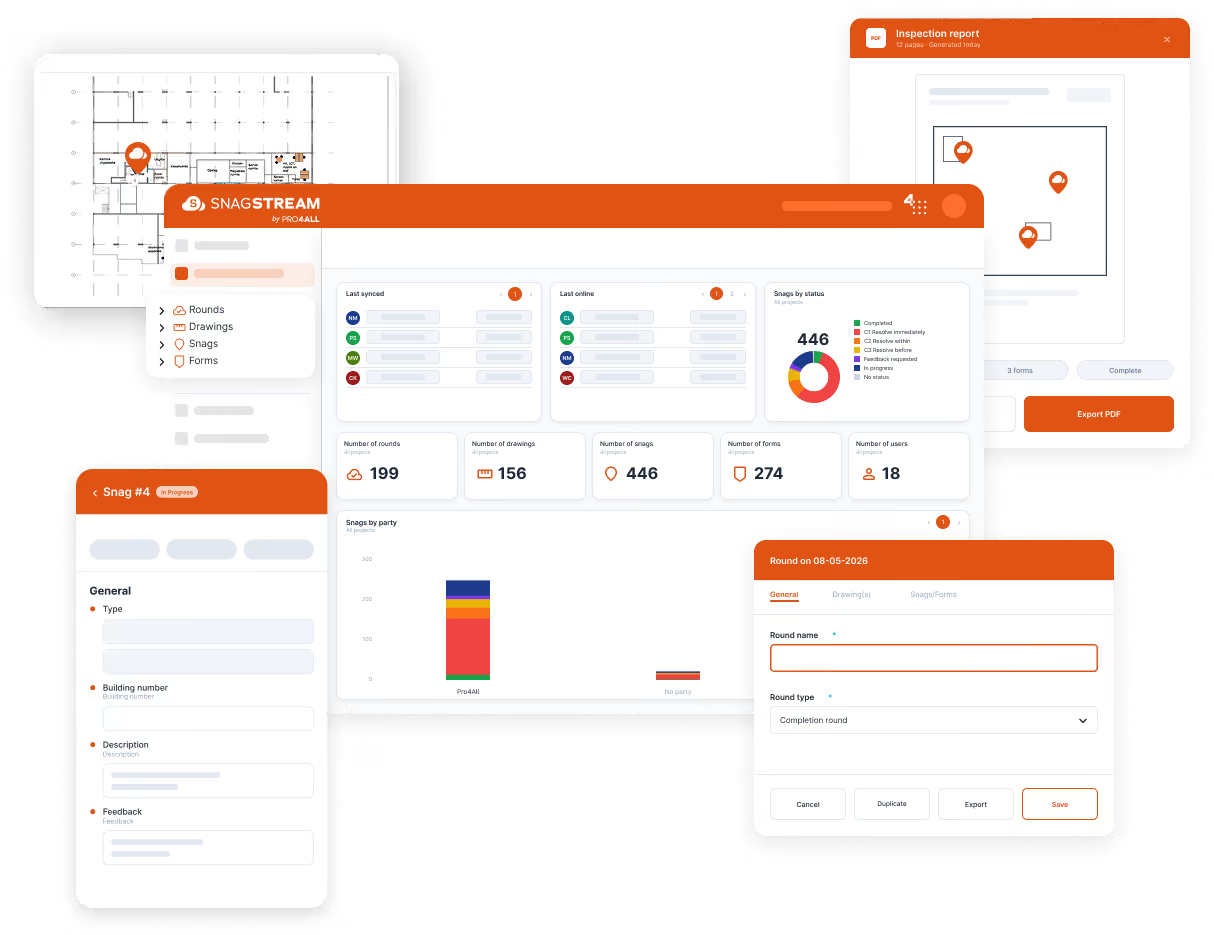
Snagstream is about one thing: fast, effortless capturing. What you see and what you do, recorded straight on the drawing, with photos attached. So you always know what was going on, what is resolved and what is still open, and you turn it into a clear report in one step.
Capture on the drawing (on site, tablet & mobile)
Upload a floor plan or elevation and capture while you walk the site. Tap the spot, add a photo, write a short note. Done. No loose lists, no "I'll do it later". No signal? Work offline and sync when you're back online.
Capture for reporting (PDF)
Turn your capture into a clear PDF report, with the points on the drawing, photos and notes, ready to share or store.
Capture for handover
Track handover and snag points per home, room or floor, without separate lists.
Capture for inspections
Record locations and findings with photos on the drawing, for fire safety, asbestos or inspection rounds.
Capture for documentation
Record work with before-and-after photos, for the file and later reference.
Capture for maintenance and facilities
Log damage, changes and facility work per location, with photos and context.
Who it's for
Who is Snagstream for?

Project teams in construction
Capture handovers and inspections directly on the drawing.
Property managers & municipalities
Record deviations with photos and report clearly for asset management.
Maintenance & renovation companies
Capture damage, changes and finishing points per unit or room.
Companies focused on inspections & safety
Record fire-safety checks, asbestos inspections or site rounds with photo evidence on the drawing.
I already know Snagstream
Used it at a previous employer, or as a municipality or client? Arrange your own licence.
Testimonials
Customers share their success stories
"After the pilot, we immediately started two additional projects."
"After a successful pilot, we decided within four weeks to launch two additional projects and roll it out company-wide. The support from Pro4all, both on site and remotely, has been outstanding."
– Gielissen


"The overall picture was the deciding factor."
"The overall picture was the deciding factor. The ease of use stood out; we'd had a different experience with previous systems. On top of document management, Pro4all also offers Snagstream, and combining the two has clear advantages."
– Heerkens en van Bavel
How it works
See Snagstream in action

European quality
Built in The Netherlands, hosted in Europe
Docstream is built in the Netherlands by a team that knows construction from the inside, and it is hosted entirely within Europe. That keeps quality, security and compliance in our hands, now and in future. Clear agreements on data management, European regulations, and full transparency about where your project information sits.
Frequently asked questions about Snagstream
Cost & licences
What does Snagstream cost?
Snagstream works for any organisation, small to large, contractor to client. The licence is based on how you use it and how many users you have. A short intro call sets a tailored price.
⮕
Is a trial available?
Yes, a 14-day trial with the core features (project management, placing snags, working on drawings). Admin features are not included.
Is a project-based licence possible?
Yes. Snagstream is project-based, with its own project environments. A subscription runs for at least one year.
Usage
My account is blocked, what should I do?
Accounts lock automatically after three failed login attempts. Only an unlimited user or Pro4all can unblock it. Contact support on +31 (0)348 489600.
I forgot my password, what should I do?
Use "Forgot password?" on the login page. You'll get a reset link by email, valid for 48 hours.
Are Snagstream trainings available?
Yes. Our YouTube channel has an overview of Snagstream trainings, plus custom sessions on request.
Can we work with standard forms and/or checklists?
Yes. Snagstream comes with standard digital forms and checklists for inspections and snags, with photos and reporting.
Can we use our own templates?
Yes. Build your own snag and form templates to match how you work.
Can I upload floor plans myself?
Yes. Add drawings in the web environment and attach snags to them.
Can I place points on drawings and link photos?
Yes. Open a drawing during your round and press and hold where you want to add a point.
Can I generate a PDF report with many photos?
Yes. Generate reports with a selection of snags, photos and location details.
Can my client have online access? Can external parties view the project?
Yes. Partners get access to assigned points and can update them via the app or website.
IT
Where are your servers located?
On three locations in Western Europe, with bank-level SSL on the connection.
Can Snagstream be integrated with other software?
Yes. Snagstream connects with Prostream (drawings/photos) and Docstream (current drawings), and has an API for further connections.
Capture every snag on site, report in one step
See how Snagstream turns a site round into a clear report in one step, on site or offline.