

BIM Model Validation
Model errors often surface only on site. Pro4all BIM Compass checks your model on every upload, for clashes and against your own rules. Now for Prostream customers, free until 26 November.
Powered by Pro4all BIM Compass.
Powered by Pro4all BIM Compass.
Trusted by:






No items found.
No items found.
No items found.
No items found.
The difference
One tool for what now takes three
Today a specialist checks clashes in one package, the issues travel through a second, and a third package takes the model to site. That is three sets of licences, and every hand-off costs time.
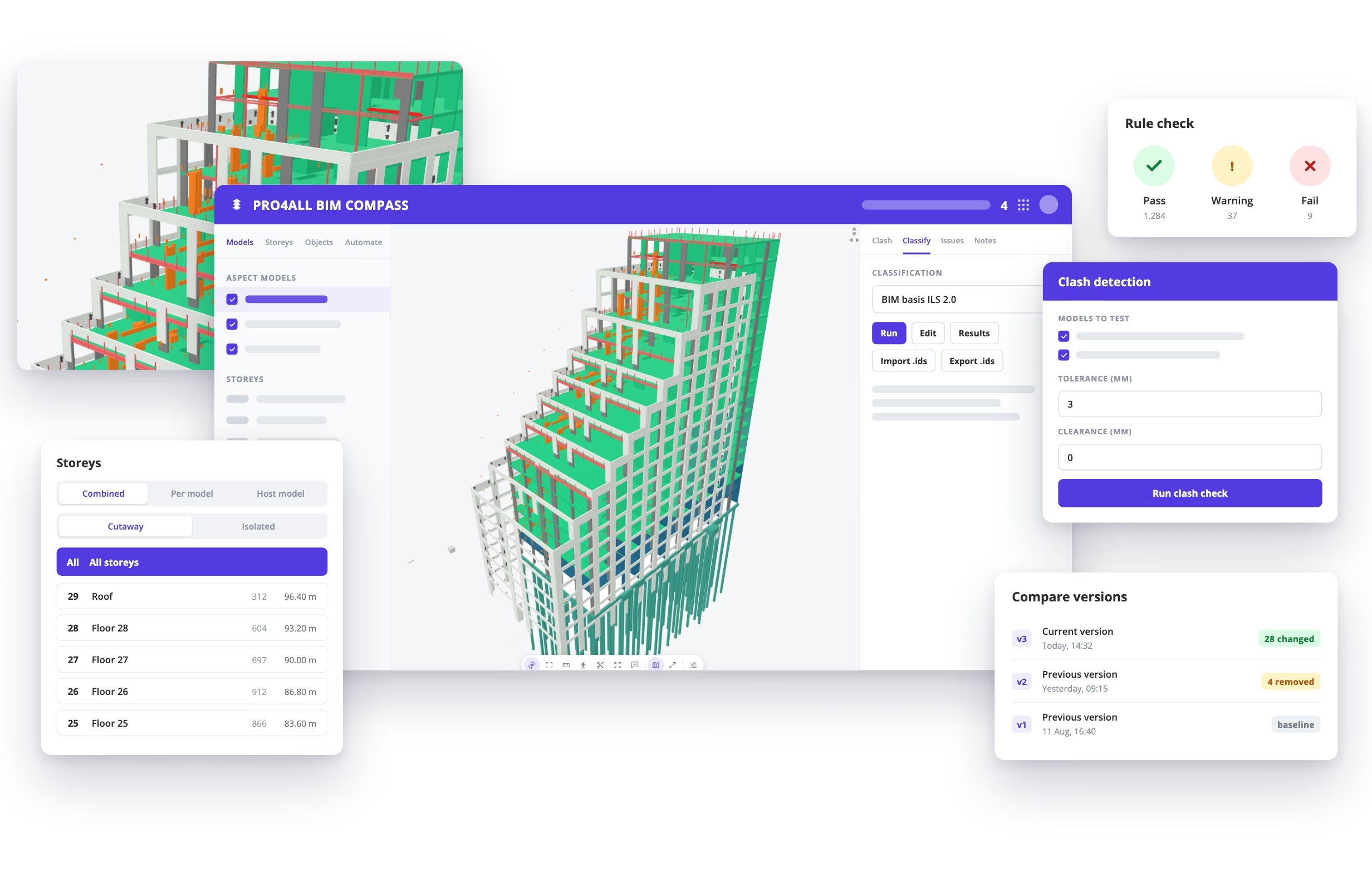
BIM Compass does it in one place: open the IFC model, run your own IDS rule sets, find the clashes and turn a finding into an issue with an owner. The heavy work runs on our servers, so even large BIM models open fast on a laptop, a tablet or a phone. Partners outside your organisation view for free.
BIM Compass does it in one place: open the IFC model, run your own IDS rule sets, find the clashes and turn a finding into an issue with an owner. The heavy work runs on our servers, so even large BIM models open fast on a laptop, a tablet or a phone. Partners outside your organisation view for free.
Features
Features that find errors before you build

Checks that run on upload
BIM Compass checks every upload for clashes and properties automatically, and creates the issues itself.

Validation against your own rules
BIM basis ILS 2.0 is ready to go. Save your own IDS rule sets for the whole company, so every project starts with the same checks.

Clash detection you can aim
All against all, or one group against another: walls against beams, ducts against load-bearing walls. You only see clashes above your own tolerance.

Fixed means fixed
On every new version, BIM Compass checks whether earlier clashes and failed properties are really solved, and shows what changed.

2D and 3D in one view
Put the PDF drawing next to the model, or over it. Colour the model by any property, such as NL-SfB, and share those views with your team and in the app.

From finding to issue
A finding becomes a BCF issue with a snapshot and an owner. BIM Compass reads and writes BCF 2 and 3, so the issue goes back to the authoring tool.
The benefits
Why choose BIM Compass?

Works with your document management
On Prostream? Click an IFC file and the model opens in BIM Compass, always in the current version. No second environment and no second login.
For the whole team, not one specialist
Most BIM work is looking, checking and sharing. The work planner, the site manager and the project lead do that in BIM Compass. Keep a few licences of your BIM tools for your specialists; the rest of the team works in BIM Compass. That saves licences.
Your rules and issues keep working
Built on open standards: IFC, IDS and BCF. The rule sets and issues you already have come with you.
No licence needed for external parties
A client, a municipality, a subcontractor with no BIM software: they view the model and comment for free in the browser, and see only the part you want them to see.
On site
See the model from where you stand
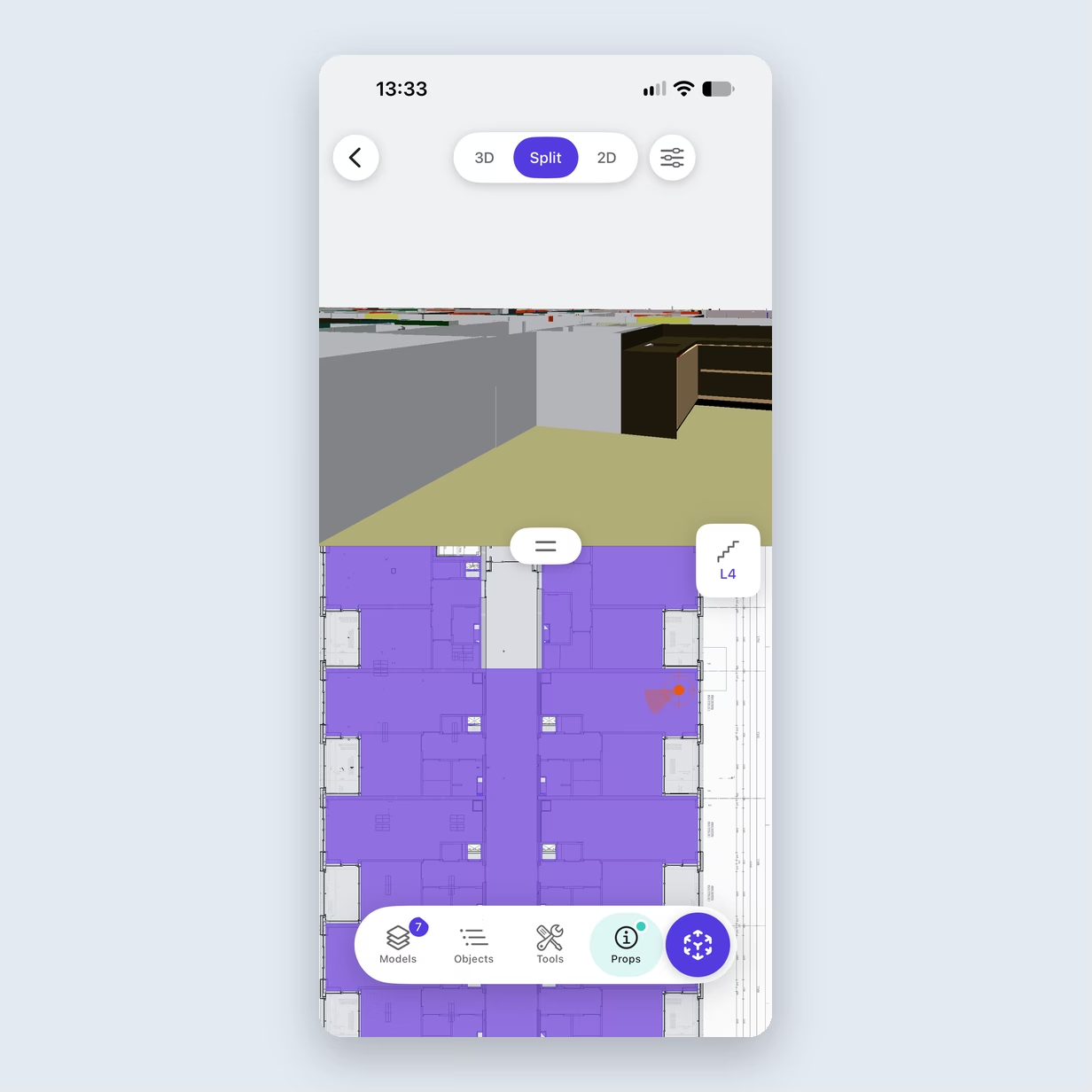
Open the project in the BIM Compass app, pick the floor, tap where you stand and which way you face, and the wall in front of you is on screen. Drawing and model side by side, measure, cut sections and download projects for offline use. The app is available for iPhone; Android follows. An AR view that lays the model over the real space is in beta. On any phone or tablet, BIM Compass also works in the browser.
Get it now
Check your next model in BIM Compass
Fill in the form and we switch BIM Compass on for your organisation. Now available for Prostream customers, and free until 26 November. After that, you decide whether to continue.
Frequently asked questions about BIM Compass
Which software does BIM Compass work with?
Right now BIM Compass works with Prostream: you open your models straight from your projects. With other BIM software, you exchange through the open standards IFC, IDS and BCF.
Which file formats does it read?
IFC and IFCZIP, with BCF 2 and 3 in and out. Revit (RVT) is available on request: we switch it on per environment, and converting Revit models is priced separately.
Does it work on site?
Yes. In the iPhone app (Android follows) and in the browser on any phone or tablet. You can download projects for offline use. The app is for viewing, measuring, sections and comments; for now, you view clash results in the browser.
Can we use one set of rules across all projects?
Yes. Import IDS rule sets or build your own, and save them at company level. Every project can use them.
Do external partners need a licence?
No. Everyone outside your organisation views the model and comments for free, without a licence. You set what each of them can see, from the whole model down to a single aspect model.
What does it cost?
Until 26 November, BIM Compass is free, with all features. After that, you decide whether to continue. If you want to go on, we make an offer that fits your organisation.
Do we have to stop using Solibri or BIMcollab?
No. Most daily BIM work, from viewing to clash checks, IDS checks and issues, can move to BIM Compass. Issues move between tools as BCF.
Do we need powerful computers?
No. Clash runs and property checks run on our servers. A browser is enough.
Where is our data stored?
In three locations in Western Europe, so your data stays available even if two of the three locations fail, and it is stored in a GDPR-compliant way.
Can I connect BIM Compass to my own software?
Yes. BIM Compass has an API and an MCP server, so you can connect it to your own tools and AI assistants.